
Video Generation
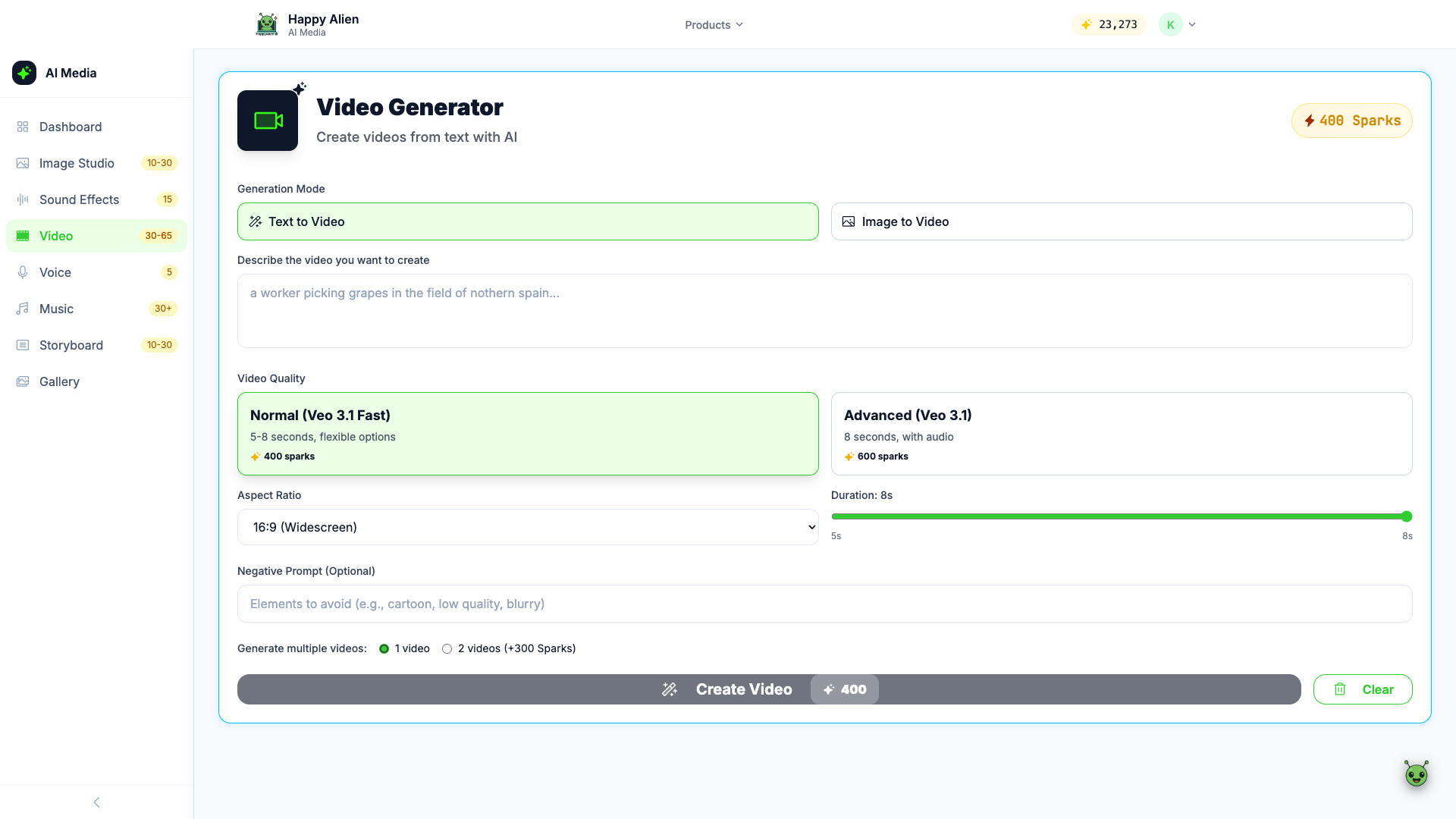
Create AI-generated videos from text descriptions or images.
Getting There
Click Video in the AI Media Studio sidebar, or go to media.happyalien.ai/video.
Generation Modes
- Text to Video — Describe the video you want in words
- Image to Video — Upload a starting image and the AI animates it
Video Quality Options
- Normal (Veo 3.1 Fast) — 5-8 seconds, flexible options. 400 Sparks
- Advanced (Veo 3.1) — 8 seconds, includes audio. 600 Sparks
Settings
- Aspect Ratio — Choose from 16:9 (Widescreen), 9:16, 1:1, 4:3, 3:4
- Duration — Slider from 5s to 8s
- Negative Prompt — Describe elements to avoid (e.g., "cartoon, low quality, blurry")
- Multiple videos — Generate 1 or 2 videos at once (2 videos costs an extra 300 Sparks)
Creating a Video
- Choose your generation mode (Text to Video or Image to Video)
- Write a descriptive prompt or upload an image
- Select quality, aspect ratio, and duration
- Optionally add a negative prompt
- Click Create Video
Videos typically take 1-3 minutes to generate. Results appear in your Gallery when complete.